# studio einszwovier Web Application
**FastAPI-based PDF print cost calculator** with automated ink coverage analysis, Matrix integration, and multi-service hub for studio einszwovier Maker Space.
[](https://www.docker.com/)
[](https://fastapi.tiangolo.com/)
[](https://matrix.org/)
---
## 🎯 Features
### Core Application
- **📄 PDF Cost Calculator**: Automated ink coverage analysis with color/B&W detection
- **🖼️ Course Management**: Dynamic course list with image gallery and modal viewer
- **📊 Cost Estimation**: Per-page breakdown with configurable rates (€/m²)
- **💬 Matrix Integration**: Automatic order submission to Matrix room
### Integrated Services
- **📚 BookStack Wiki**: Documentation and knowledge base (port 6875)
- **🤖 Ollama + Open WebUI**: Local LLM chatbot interface (port 8080)
- **📨 Matrix Synapse**: Print order collection and payment tracking (port 8008)
- **� Element Web**: Browser-based Matrix chat client (port 8082)
- **�🐳 Portainer**: Container management dashboard (port 9000)
- **📓 JupyterHub**: Multi-user Jupyter notebook server for drone programming (port 8001)
- **🦊 Forgejo**: Self-hosted Git service for code collaboration (port 3003)
- **🔄 Watchtower**: Automatic container updates every 24 hours
- **🗂️ Autokanban**: Kollektive To‑Do‑Liste / Aufgabenboard (port 8000)
---
## 🏗️ Architecture
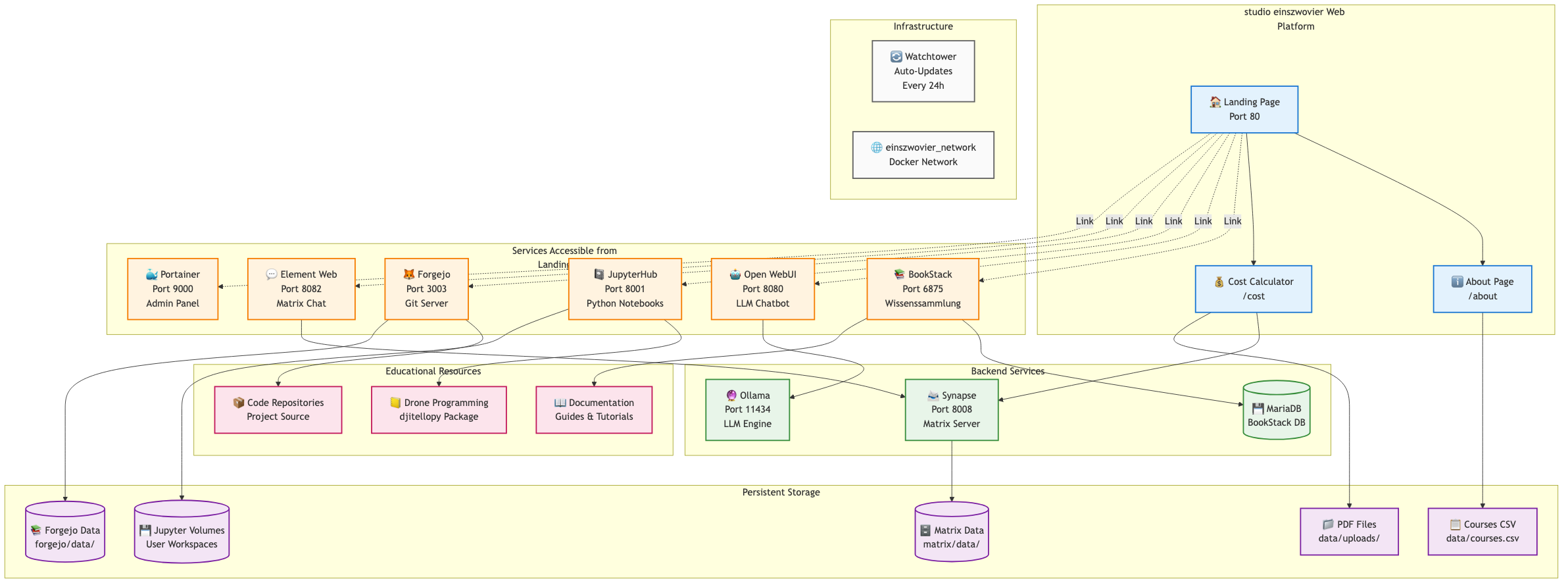
View Mermaid source code
```mermaid
graph TB
subgraph "studio einszwovier Web Platform"
LP[🏠 Landing Page
Port 80]
About[ℹ️ About Page
/about]
CostCalc[💰 Cost Calculator
/cost]
LP --> About
LP --> CostCalc
end
subgraph "Services Accessible from Landing Page"
BookStack[� BookStack
Port 6875
Wissenssammlung]
OpenWebUI[🤖 Open WebUI
Port 8080
LLM Chatbot]
JupyterHub[� JupyterHub
Port 8001
Python Notebooks]
Forgejo[🦊 Forgejo
Port 3003
Git Server]
ElementWeb[� Element Web
Port 8082
Matrix Chat]
Portainer[� Portainer
Port 9000
Admin Panel]
LP -.->|Link| BookStack
LP -.->|Link| OpenWebUI
LP -.->|Link| JupyterHub
LP -.->|Link| Forgejo
LP -.->|Link| ElementWeb
LP -.->|Link| Portainer
end
subgraph "Backend Services"
Synapse[� Synapse
Port 8008
Matrix Server]
Ollama[🔮 Ollama
Port 11434
LLM Engine]
MariaDB[(� MariaDB
BookStack DB)]
ElementWeb --> Synapse
OpenWebUI --> Ollama
BookStack --> MariaDB
CostCalc --> Synapse
end
subgraph "Educational Resources"
Notebooks[📒 Drone Programming
djitellopy Package]
GitRepos[📦 Code Repositories
Project Source]
Knowledge[� Documentation
Guides & Tutorials]
JupyterHub --> Notebooks
Forgejo --> GitRepos
BookStack --> Knowledge
end
subgraph "Persistent Storage"
PDFUploads[📁 PDF Files
data/uploads/]
CoursesCSV[📋 Courses CSV
data/courses.csv]
MatrixData[(🗄️ Matrix Data
matrix/data/)]
JupyterVols[(💾 Jupyter Volumes
User Workspaces)]
ForgejoData[(📚 Forgejo Data
forgejo/data/)]
CostCalc --> PDFUploads
About --> CoursesCSV
Synapse --> MatrixData
JupyterHub --> JupyterVols
Forgejo --> ForgejoData
end
subgraph "Infrastructure"
Watchtower[🔄 Watchtower
Auto-Updates
Every 24h]
Network[🌐 einszwovier_network
Docker Network]
end
classDef webapp fill:#e3f2fd,stroke:#1976d2,stroke-width:2px
classDef service fill:#fff3e0,stroke:#f57c00,stroke-width:2px
classDef backend fill:#e8f5e9,stroke:#388e3c,stroke-width:2px
classDef storage fill:#f3e5f5,stroke:#7b1fa2,stroke-width:2px
classDef edu fill:#fce4ec,stroke:#c2185b,stroke-width:2px
classDef infra fill:#fafafa,stroke:#616161,stroke-width:2px
class LP,About,CostCalc webapp
class BookStack,OpenWebUI,JupyterHub,Forgejo,ElementWeb,Portainer service
class Synapse,Ollama,MariaDB backend
class PDFUploads,CoursesCSV,MatrixData,JupyterVols,ForgejoData storage
class Notebooks,GitRepos,Knowledge edu
class Watchtower,Network infra
```
---
## 🚀 Quick Start
### Prerequisites
**On the host system:**
- **Docker** & **Docker Compose** installed
- **curl** - for testing and healthchecks (install: `brew install curl` on macOS)
- **Poppler** (for pdf2image - included in Docker)
- **Port availability**: 80, 3003, 6875, 8001, 8008, 8080, 8082, 9000, 11434
- **Port availability**: 80, 3003, 6875, 8000, 8001, 8008, 8080, 8082, 9000, 11434
**Note:** Python dependencies are containerized and don't need to be installed on the host.
### Installation
1. **Clone the repository:**
```bash
git clone https://github.com/arontaupe/124-webapp.git
cd 124-webapp
```
2. **Configure environment:**
```bash
cp .env.example .env
nano .env # Update SERVER_HOSTNAME and passwords
```
3. **Start the stack:**
```bash
docker compose up -d --build
```
4. **Access services:**
- Web App: (or )
- BookStack:
- Open WebUI:
- Portainer:
- Matrix:
- Element Web:
- Autokanban:
- JupyterHub:
- Forgejo:
### First-Time Setup
1. **Get Matrix Room ID:**
```bash
python get_room_id.py
```
2. **Update .env with room ID:**
```bash
MATRIX_ROOM="!YourRoomID:${SERVER_HOSTNAME}"
```
3. **Restart web container:**
```bash
docker compose restart web
```
---
## 📚 Course Management
Courses are managed via CSV file with optional images:
### Add a Course
1. **Edit `data/courses.csv`:**
```csv
title,description,dates,offen_fuer,image
My Course,Learn cool stuff,"Oct '25",Grade 10,/static/images/courses/my-course.jpg
```
2. **Add course image (optional):**
```bash
cp my-image.jpg static/images/courses/my-course.jpg
```
3. **Changes apply immediately** (no restart needed)
### Course Image Features
- **Thumbnail view**: 80x80px next to course info
- **Hover zoom**: Expands to 200x200px on hover
- **Click to enlarge**: Opens full-size modal viewer
- **Auto-cropping**: `object-fit: cover` ensures uniform display
See [data/KURSE_README.md](data/KURSE_README.md) for detailed documentation.
---
## 🔧 Configuration
### Environment Variables
Key variables in `.env`:
```bash
# Server Configuration
SERVER_HOSTNAME=your-server.com
# Print Rates (€/m²)
RATE_PER_M2_BLACK=4.0
RATE_PER_M2_COLOR=5.0
# Matrix Integration
MATRIX_USER="@einszwovier:${SERVER_HOSTNAME}"
MATRIX_PASS="your_password"
MATRIX_HOMESERVER="http://${SERVER_HOSTNAME}:8008"
MATRIX_ROOM="!RoomID:${SERVER_HOSTNAME}"
# Service Ports
SYNAPSE_PORT=8008
OLLAMA_PORT=11434
OPENWEBUI_PORT=8080
BOOKSTACK_PORT=6875
PORTAINER_PORT=9000
JUPYTER_PORT=8001
FORGEJO_PORT=3003
# JupyterHub Authentication
JUPYTER_PASSWORD=einszwo4
```
See [.env.example](.env.example) for full configuration.
---
## 🐳 Docker Services
| Service | Image | Port | Purpose | Resources |
|---------|-------|------|---------|-----------|
| **web** | Custom (FastAPI) | 80 | Main application | 1 CPU, 1GB RAM |
| **synapse** | matrixdotorg/synapse | 8008 | Matrix homeserver | 2 CPU, 2GB RAM |
| **ollama** | ollama/ollama | 11434 | LLM inference | 6 CPU, 16GB RAM |
| **open-webui** | ghcr.io/open-webui/open-webui | 8080 | LLM chat UI | 2 CPU, 2GB RAM |
| **bookstack** | lscr.io/linuxserver/bookstack | 6875 | Documentation wiki | Default |
| **bookstack-mariadb** | lscr.io/linuxserver/mariadb | 3306 | Database for BookStack | Default |
| **jupyterhub** | Custom (Python 3.13) | 8001 | Multi-user Jupyter notebooks | 2 CPU, 2GB RAM |
| **forgejo** | codeberg.org/forgejo/forgejo:11 | 3003, 222 | Git service (web, SSH) | Default |
| **portainer** | portainer/portainer-ce | 9000, 9443 | Container management | Default |
| **watchtower** | containrrr/watchtower | - | Auto-updates (24h) | Default |
### Health Checks
All services have health checks configured:
- **web**: `curl http://localhost:8000/`
- **synapse**: `curl http://localhost:8008/_matrix/static/`
- **ollama**: `curl http://localhost:11434/`
- **open-webui**: `curl http://localhost:8080/`
- **bookstack**: `curl http://localhost/`
- **mariadb**: MariaDB query test
- **portainer**: API status check
- **watchtower**: Process check
---
## 📖 Documentation
- **[SECURITY.md](SECURITY.md)** - Security best practices and secrets management
- **[PORTABILITY.md](PORTABILITY.md)** - Server migration guide
- **[PRE_RELEASE_CHECKLIST.md](PRE_RELEASE_CHECKLIST.md)** - Pre-publication verification
- **[data/KURSE_README.md](data/KURSE_README.md)** - Course management guide
---
## 🔐 Security
**Before deploying to production:**
1. ✅ Change all passwords in `.env`
2. ✅ Generate new `BOOKSTACK_APP_KEY`
3. ✅ Update Matrix credentials
4. ✅ Configure firewall (restrict Portainer access)
5. ✅ Set up HTTPS/SSL
6. ✅ Enable automated backups
See [SECURITY.md](SECURITY.md) for comprehensive security guidelines.
**Security Disclosure:** If you discover a vulnerability, email `einszwovier@gvb-gymnasium.de` instead of opening a public issue.
---
## 🔄 Backup & Restore
### Backup All Data
```bash
./backup.sh
```
Creates timestamped backups of:
- BookStack database & files
- Matrix homeserver data
- PDF uploads
- Course data & images
- Environment configuration
### Restore from Backup
```bash
./restore.sh YYYYMMDD_HHMMSS
```
---
## � BookStack API (create pages programmatically)
You can automate content creation in BookStack using the HTTP API and a Personal Access Token (User Settings → API Tokens).
Example `curl` to list books:
```bash
curl -H "Authorization: Token token=\"$BOOKSTACK_API_TOKEN\"" \
"$BOOKSTACK_APP_URL/api/books"
```
Create a page with `curl`:
```bash
curl -X POST -H "Authorization: Token token=\"$BOOKSTACK_API_TOKEN\"" \
-H "Content-Type: application/json" \
-d '{"name":"My Page","book_id":1,"html":"Hello
"}' \
"$BOOKSTACK_APP_URL/api/pages"
```
There's a small helper script in the repo: `bookstack_api_create_page.py` which demonstrates listing books and creating a page interactively.
---
## �🚢 Deployment & Portability
This application is designed to be **fully portable**. To move to a new server:
1. **On old server:**
```bash
./backup.sh
```
2. **On new server:**
```bash
git clone
cd 124-webapp
cp .env.example .env
# Update SERVER_HOSTNAME in .env
./restore.sh YYYYMMDD_HHMMSS
docker compose up -d
```
See [PORTABILITY.md](PORTABILITY.md) for detailed migration guide.
---
## 🛠️ Development
### Local Development
```bash
# Option 1: Direct Python (with auto-reload)
python run_app.py
# Option 2: Docker Compose
docker compose up --build
```
### Project Structure
```zsh
.
├── main.py # FastAPI application
├── cost_calculator.py # PDF analysis logic
├── mailer.py # Matrix integration
├── templates/ # Jinja2 templates
│ ├── base.html
│ ├── landing.html
│ ├── about.html
│ ├── cost-calculator.html
│ └── result.html
├── static/ # CSS, images, fonts
│ ├── css/style.css
│ ├── images/
│ └── fonts/
├── data/
│ ├── courses.csv # Course database
│ └── uploads/ # PDF uploads
├── docker-compose.yml # Service orchestration
├── Dockerfile # Web app container
└── requirements.txt # Python dependencies
```
### Key Technologies
- **FastAPI** - Modern Python web framework
- **PyPDF2** - PDF metadata extraction
- **pdf2image** - PDF to image conversion
- **Pillow + NumPy** - Image processing & ink analysis
- **matrix-nio** - Matrix protocol client
- **Jinja2** - Template engine
- **Gunicorn + Uvicorn** - Production WSGI/ASGI servers
---
## 🤝 Contributing
Contributions are welcome! This is part of **studio einszwovier**, a collaborative Maker Space.
1. Fork the repository
2. Create a feature branch (`git checkout -b feature/amazing-feature`)
3. Commit your changes (`git commit -m 'Add amazing feature'`)
4. Push to the branch (`git push origin feature/amazing-feature`)
5. Open a Pull Request
---
## 📄 License
This project is part of studio einszwovier educational initiative.
---
## 📞 Contact
**studio einszwovier**
Gabriele-von-Bülow-Gymnasium
Tile-Brügge-Weg 63, 13509 Berlin (Tegel)
- **Email**:
- **Team**: Aron Petau & Friedrich Weber
- **Hours**: Tuesday - Thursday, 11:00 - 16:00
- **Location**: Room 124
---
## 🙏 Acknowledgments
- Matrix.org for the communication protocol
- Ollama team for local LLM support
- BookStack for the documentation platform
- FastAPI community
- All contributors and students of studio einszwovier
---
Made with ❤️ at studio einszwovier Maker Space